Skip to content
Chat with a Pro to take your lawn from good to great!
Areas We Serve
Our Blog

Access Your Customer Portal

We are upgrading your online experience!

Please check your email for updated login credentials to your new customer portal.

Thank you for choosing Blades of Green!

Login to Your Account


-View past & upcoming services
-See technician recommendations
-Make secure payments
-Submit a customer service case
-and much more!

Here are just a few benefits of your new Customer Portal:

FAQs


How do I login to my Customer Portal?

To access your new Customer Portal, open the email* from Blades of Green with the subject line: Welcome to Your New Blades of Green Customer Portal!

*If you have not received an email inviting you to the Customer portal, move to the next question, "How do I register?"

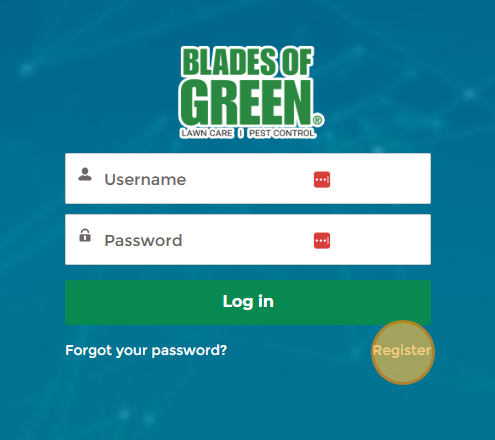
To visit the Customer Portal Login screen, click the "Customer Portal" button in your email or click this link: https://www.mylawnportal.com/s/login/?expid=bladesofgreen. 


Select “Forgot Password”. You will be emailed a link to reset your password.
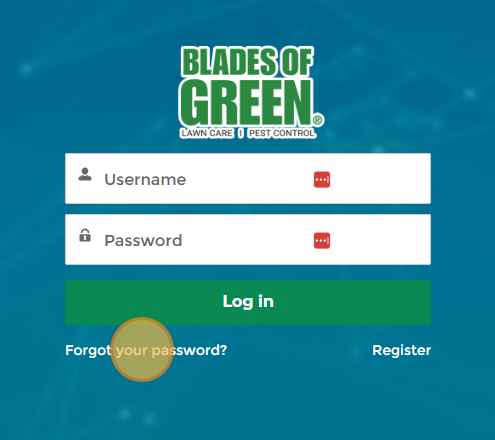
 
Within the email, you’ll find your new username. Copy your new username and paste it into the Password Reset screen.
Customer-Portal-Password-Reset-2
 
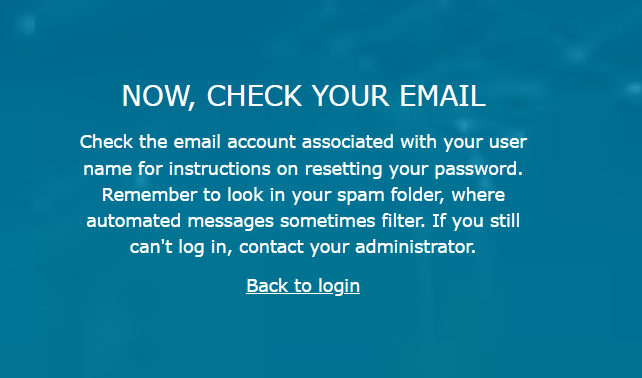
After you select "Reset Password", open your email and follow the instructions to continue with the password reset.
Customer-Portal-Password-Reset-3


How do I register a new account?

Each new user should receive an email from Blades of Green with the subject line: Welcome to Your New Blades of Green Customer Portal!

Your username will be included in that email. If you accidentally deleted your 'Welcome' email and need access to your username, please call our office: (410) 346-3451.

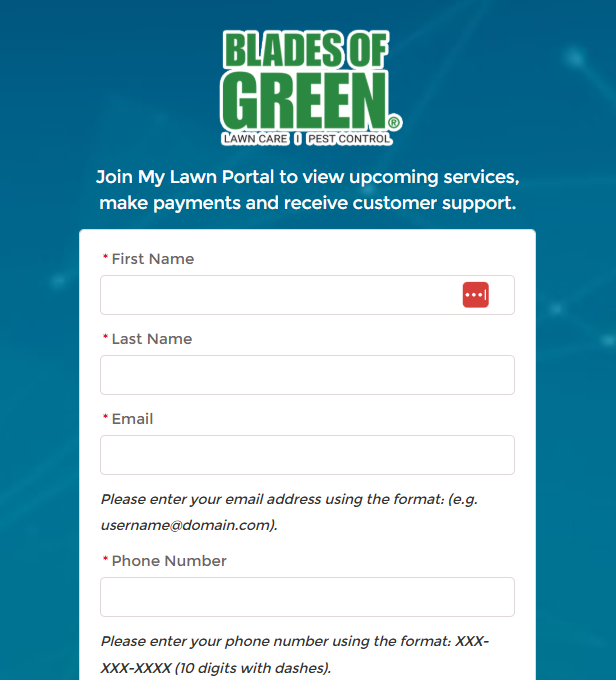
If you have not received an email and would like to register yourself online, visit your Customer Portal: https://www.mylawnportal.com/s/login/?expid=bladesofgreen.

 Select "Register".

Fill out the form and select "Register".

How can I view upcoming services?
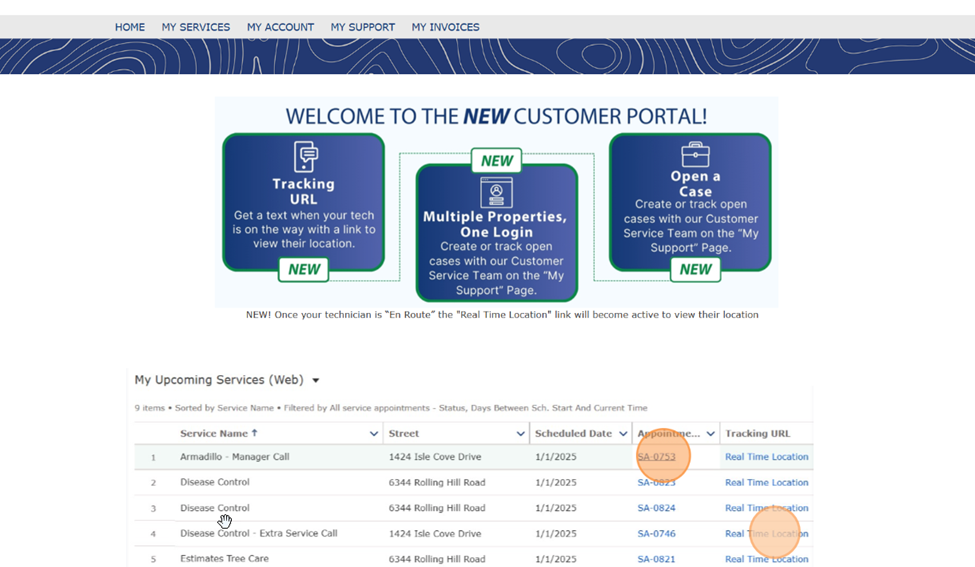
Once logged into the Customer Portal, find Upcoming Services by scrolling below the Welcome message.
 
You may click on the Service Appointment link to view details about it.


How do I view my account details?

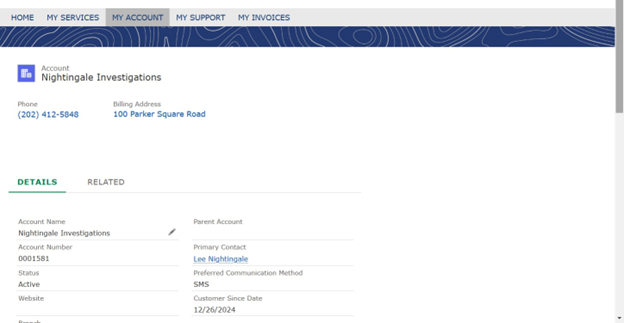
Once logged into the Customer Portal, click “My Account.” You’ll find the account owner, phone number, and billing address along the top.


The account number is found under “Details”, as well as the account status, service branch and preferred communication method.


By clicking “Related” you’ll see associated Contacts and Assets (properties). To access more information, click on the individual contact names or property addresses.

What is my current billing status?
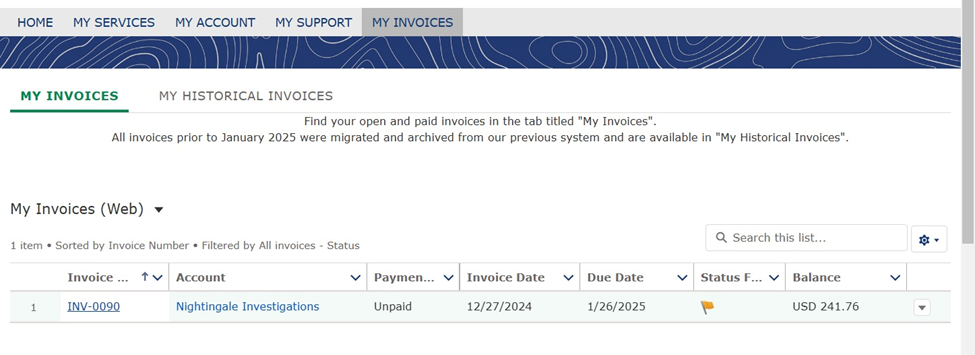
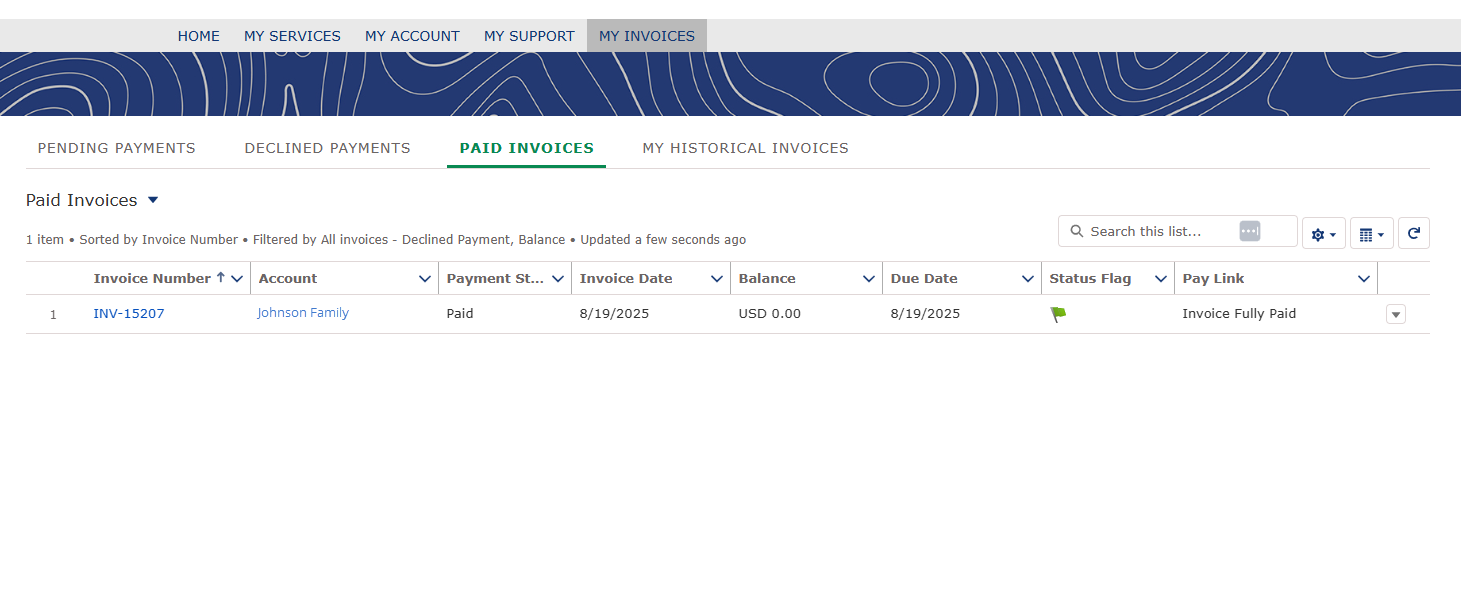
After logging into the Customer Portal, visit “My Invoices”.
 
Find your open and paid invoices in the tab titled “My Invoices”. Click on an invoice number to view status details.
 
How do I add a new payment method?

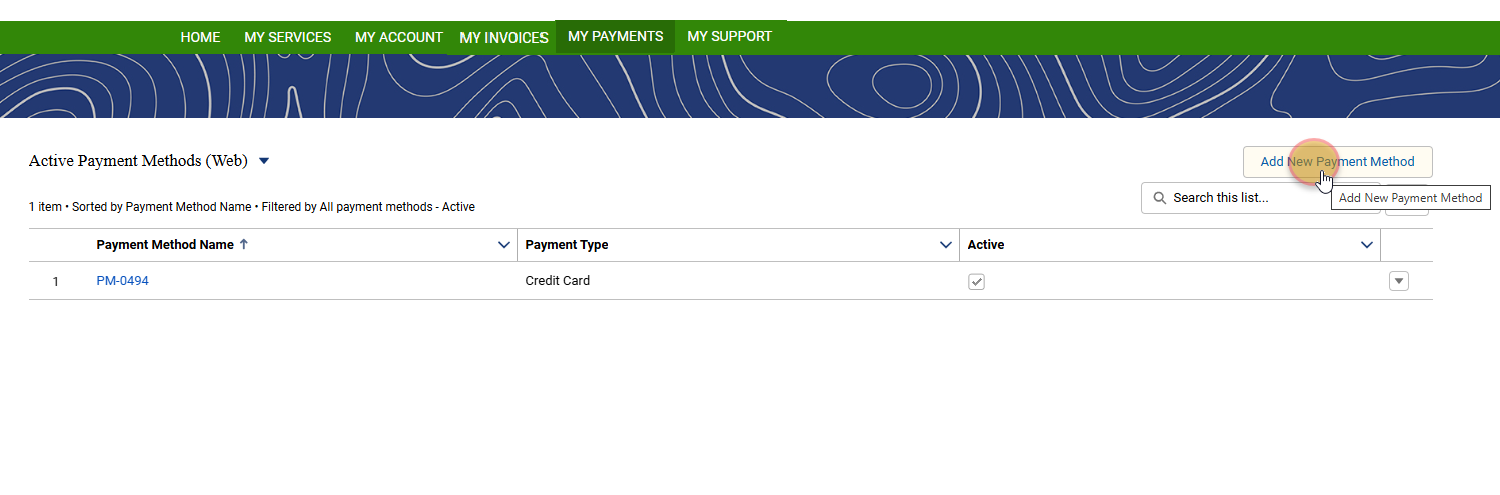
To add a new payment method, login to your Customer Portal. 

Navigate to "My Payments" and select "Add New Payment Method". Enter your new payment information into the pop-up window and submit.

How do I make a payment?

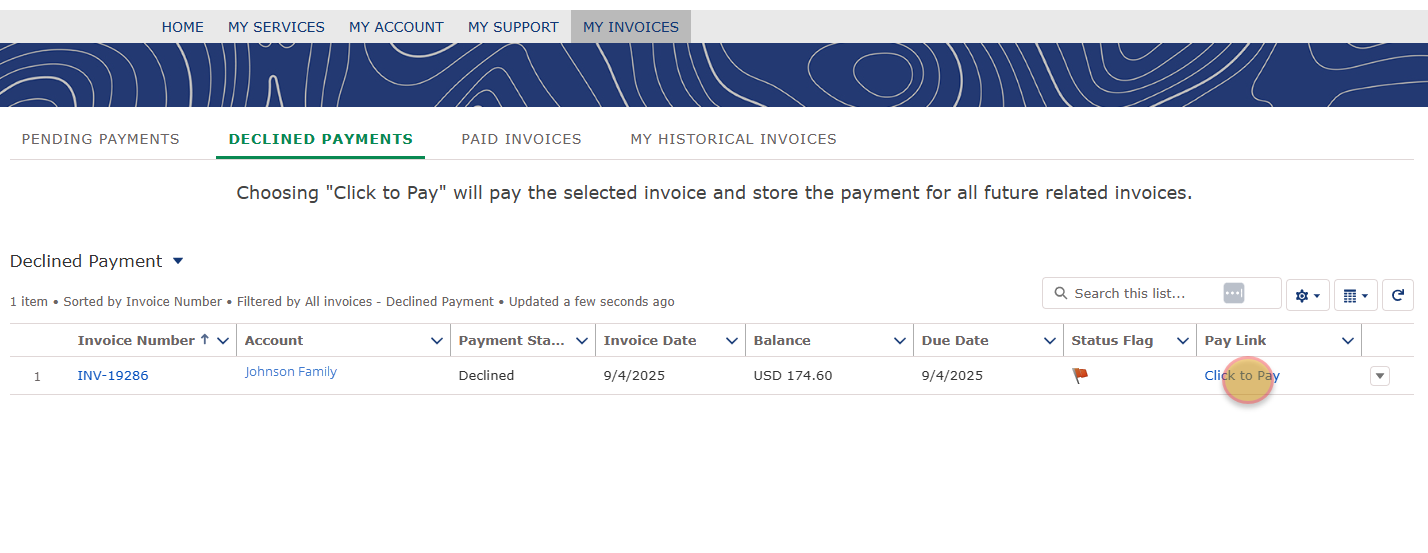
When logged into your Customer Portal, click "My Invoices" in the main menu. Select the "Pending Invoices" or "Declined Invoices" tab, then click "Click to Pay".


Can I access past invoices?
After logging into the Customer Portal, visit “My Invoices.”
 
Find your open and paid invoices in the tab titled “My Invoices.” Invoices from the previous Customer Portal are available in “My Historical Invoices.”
 
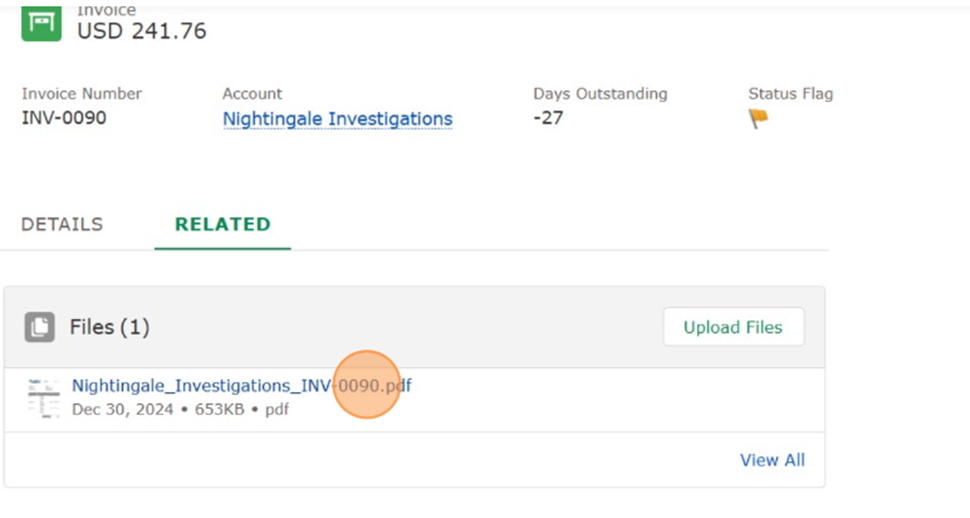
Click on an invoice number to view status details.


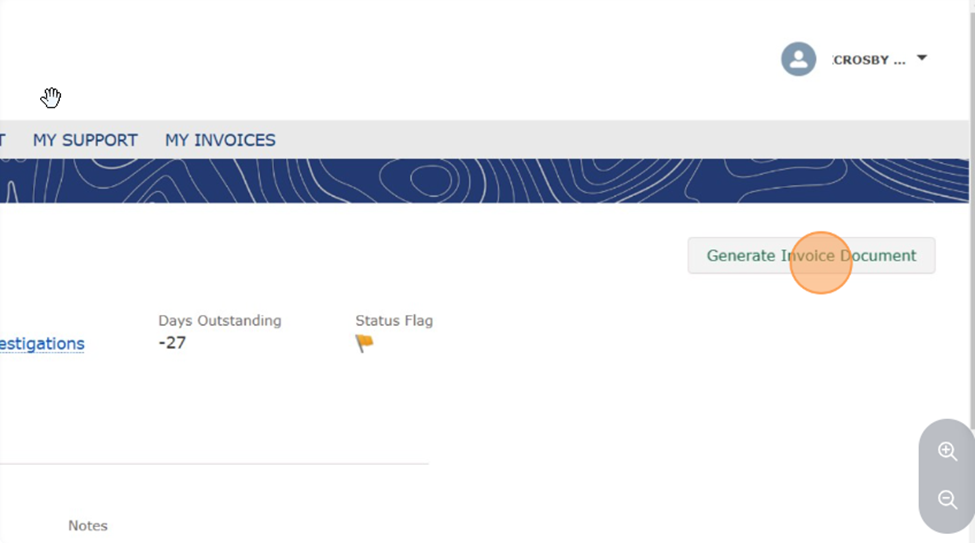
To download a copy of your invoice, click the “Generate Invoice Document” button.


After generating, the PDF can be found in the “Related” section of the page.


How do I add or change my services?

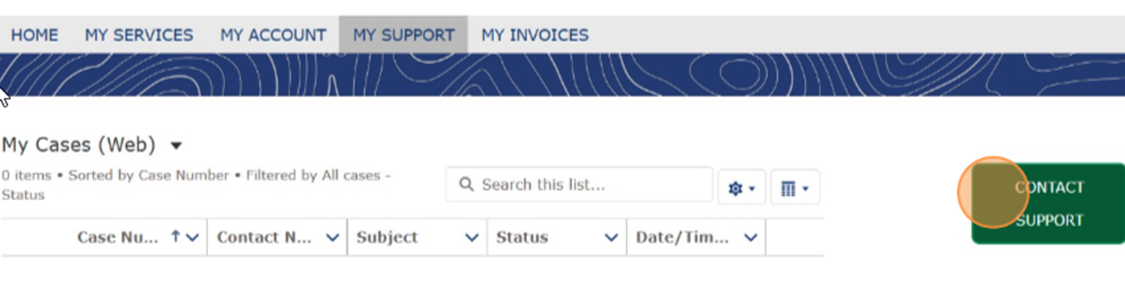
Customers cannot add or change a service from the Customer Portal, but they can request a change from the Portal by visiting “My Support” and clicking “Contact Support” to open a new ticket with our Customer Service Team.

How do I change my password?

To reset your password, visit your Customer Portal: https://www.mylawnportal.com/s/login/?expid=bladesofgreen. 

Select “Forgot Password”. You will be emailed a link to reset your password.
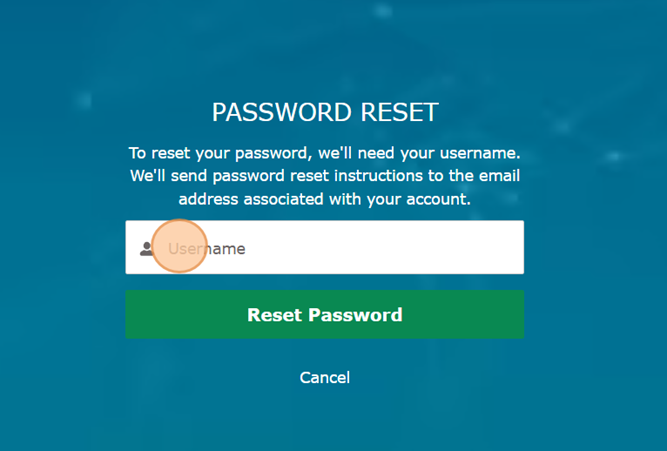
 
To access your username, open the email* from Blades of Green with the subject line: Welcome to Your New Blades of Green Customer Portal!
 
Copy your username and paste it into the Password Reset screen.
 

*If you have not received an email inviting you to the Customer portal, move to the question, "How do I register?"

Customer-Portal-Password-Reset-2
 
After you select "Reset Password", open your email and follow the instructions to continue with the password reset.
 
Customer-Portal-Password-Reset-3


If I have multiple properties, how can I view them all in one Customer Portal? We’re happy to help! To link multiple properties under your Customer Portal, just email our team at CustomerCare@BladesofGreen.com. We’ll get everything set up for you.
How is my data secure? We care about you and protecting your data. We keep your credit card information safe by utilizing tokenization. Card information is never stored directly in the system, instead it is replaced with unique tokens that only the payment gateway can decrypt, significantly reducing the risk of data exposure.

Still have questions? 

Our team is happy to help! Give us a call at  (410) 346-3451


One-Time Service for Special Events

We all love attending outdoor events, whether it’s a wedding, family barbecue, or pool party—so don’t let mosquitoes spoil the fun! We offer Special Event Mosquito control that guarantees that your outdoor space will be as mosquito-free as possible for that special event.

This service includes an area-specific mosquito treatment within 24-48 hours of your celebration, utilizing an effective, odor-free product.

WHAT OUR CUSTOMERS ARE SAYING

Real Stories. Real Results. Trusted Pest Protection You Can Count On.

Joe Amato
"Great Job Guys!!"

A long time customer of Blades of Green Lawn care, Great company very organized and well run. In addition to the great lawn service I have enjoyed over the years, I was contacted by the B.O.G. automated service alerting me of the arrival of the ZIKA mosquitos. I followed their advice and had both of my properties treated! Since the treatment I no longer have to fear getting a little head, or whatever this ZIKA thing causes.

Sharon Metro
"Thank you Blades of Green"

I have used Blades of Green for almost ten years and my lawn is beautiful! They follow a good business model in that they always call ahead to let me know they are coming, and they give me a full report afterwards. Whenever there are any specific problems or issues with particular weeds or trouble spots, I get an immediate response. They are excellent technicians and always a pleasure to work with. 

Brady C.
"Will Recommend!!"

I've been a customer for a very long time. Customer service is out of this world. Not only will I continue with their service I will recommend them to everyone. The technicians are always polite and on time and they're scheduling is always accommodating of my schedule.

Our Blog

The Dirt

Lawn Care

header-logo01 (1)


Maryland Office

645 Central Ave E #201
Edgewater, MD 21037
Call (410) 844-5763


Virginia Office

7627 Fullerton Rd., Suite E2
Springfield, VA 22153
Call (703) 313-2056


Office Hours

Monday - Friday: 8 am - 6 pm
Saturday: 8 am - 12 pm
Closed on Sunday


Call (410) 346-3451